The Pearl’s Gazette

Hey editors and visitors!

Toaday we will have a gazette dedicated to the pleasures of traveling.

luggage

voyages!

This beautiful map made by Emilie gives precious information if you plan to go to Morocco and especially to the famous harbour Essaouira. She tells you all the good addresses for a nice spa or some Turkish baths. You will also find precious tips concerning delicious restaurants in a French area famous for its gastronomy and its wines… The”Bourgogne”! (for the brave ones there is one renowned for his “cuisses de grenouilles” : )

guidemichelin

miam!!!

Talking about gastronomy (yes, we are French…), francois did a great map about his favourites parisian’s restaurants. I really advise you to use it whenever you come to France, or to take your girlfriend out for diner, or just to try new tastes!
plongee
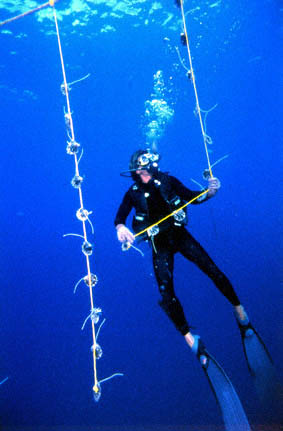
Plongée croisière Thailande

Now we are going on a trip to Asia. Let’s navigate in pierrep’s map and scuba dive in a hot sea near the Thaïland’s coasts. Concerning diving, here is a silly game; and a very silly game you could try ;).

photo_lg_chinachina

After this refreshing break what about discovering a whole culture through a great map made by Lucile? There are pearls about Chinese industry, arts, fashion, singers… It’s always fascinating to explore the differences with our own Occidental knowledge, behaviours and attitudes.

japanJapanese Holidays

Eventually, we should end our trip on a very special island! In ten days Nicolas drive you all around Japan and shows you all the particularities and charms of the Japanese culture (sushis, temples, gardens, sumos, the famous shinkansen…). Crystal Lust porn Everything is perfectly planned and well explained.

Enjoy!

How to get pearls?

There are different ways to make pearls.

1/ Use Pearltrees’ extension to pearl while browsing

Pearltrees offers several extensions to enable anyone to “Pearl” the stuff they like on the web while browsing. You can install Pearltrees’ add-on for Firefox, Pearltrees’ extension for Chrome, Pearltrees’ plugin for IE and Pearltrees bookmarklets for other browsers.

A. Pearltrees’ addon for Firefox

It has 3 buttons

Pearl: Image 4 records and turns into a pearl the URL visited.

In: Image 5 Allows you to directly select the map within which you will put the URL you are recording.

Reveal: Image 6To directly access the selected map.

Tip : With the add-on you can now teleport yourself within one of your pearltree. Just select it through the button « in » and click on « reveal ».

B. Pearltrees’ extension for Chrome

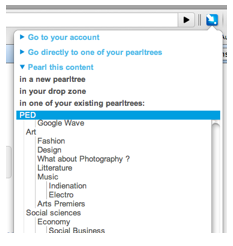
Image 14

It is really simple. You click on the button in your browser to open the list. Then, you click in the list where you want to put the pearl displayed in your browser. And, if you click “Go to your account”… you go to your account! 😉

C. Pearltrees’ plugin for IE (Internet Explorer)

It works in the same way as Firefox add-on

D. The Bookmarklet (for any browser)

It’s a simple button you can drag and drop to the toolbar of your browser. Then it works really simply, you click on it, it opens a list and then you choose where to pearl the web page displayed in your browser.

2/ Use Twitter sync. to pearl while twittering

You can synchronize your Pearltrees account to your Twitter. It will enable you to pearl all the web pages you tweet!

3/Pearl directly from your account

There are two ways to pearl directly from Pearltrees.

At first, when exploring others account by using the minipearl and the search, pick the pearls and the pearltrees that interest you and put them in your basket. When you go back to your account, they will be automatically replicated and you will be able to put them in your account as you like.

You can also pearl directly from your account: just click on “new pearl” or “new pearltree” depending on what you need!

Créer des perles

Il y a différents moyens de créer des perles.

1/ Perlez pendant votre navigation avec les extensions

Il y a plusieurs extensions disponibles pour permettre à chacun de perler ce qu’il aime au cours de sa navigation. Il est possible d’installer une extension pour Firefox, Chrome, Internet Explorer ou d’utiliser des bookmarklets pour les autres navigateur.s

A. L’extension Pearltrees pour Firefox

Elle comporte trois boutons:

Perle: Image 4 Transforme en perle l’URL que vous visitez

Dans: Image 5 Pour choisir le pearltree dans lequel sera stocké la perle de l’URL visitée

Révéler: Image 6 Pour retourner dans votre compte

Tip : avec l’extension, vous pouvez maintenant vous téléporter en un clin d’oeil dans n’importe quel pearltree de votre compte. Sélectionnez le pearltree où vous souhaitez atterrir avec le bouton « dans» et cliquez sur “révéler” pour opérer la téléportation.

B. L’extension Pearltrees pour Chrome

Image 14

Au cours de votre navigation, dès que vous trouvez une page qui vous intéresse, vous cliquez sur le bouton Pearltrees et vous cliquez sur le pearltree dans lequel vous souhaitez la ranger… et c’est tout !

C. L’extension Pearltrees pour Internet Explorer

Elle marche de la même façon que celle pour Firefox !

D. le Bookmarklet (pour n’importe quel navigateur)

C’est un bouton que vous installer en faisant un glisser-déplacer dans la barre de favoris de votre navigateur. Cliquez dessus pour ouvrir la liste de vos pearltrees puis choisissez celui dans lequel vous souhaitez perler la page qui est affichée par votre navigateur.

2/ Perlez en twittant avec la Twitter sync

Vous pouvez synchroniser votre compte Pearltrees avec votre compte Twitter, ce qui permet de perler toutes les pages web que vous twittez !

3/Perlez directement depuis votre compte

Il y a deux manières de pearler depuis Pearltrees.

  • D’abord on peut explorer les comptes des autres utilisateur avec la miniperle ou la recherche, et dès que l’on trouve une perle ou un pearltree qui nous plait, on le prend et on le met dans son panier. La perle est alors automatiquement dupliquée et de retour à son compte, on peut placer la dans son compte.
  • On peut aussi « perler » directement depuis son compte. Il suffit pour cela de cliquer sur « nouvelle perle » ou « nouveau pearltree » en fonction de la nature de la perle que l’on souhaite créer.